
Challenges Guide
Learn how Ledgr Challenges turn your bank SMS spending into a daily safe-to-keep jar, a level ladder, and badges you can actually earn.
Challenges turn passive expense tracking into a small daily win. Instead of just watching your spending, Ledgr gives you one cap to stay under each day, banks what you keep into a jar, and rewards the streaks with levels and badges. Nothing to log by hand — your bank SMS does the tracking.
What this screen is for
The Challenges screen is where today’s goal lives. The core idea is simple: stay under today’s cap and you “bank” the difference into a jar. Open the full Challenges screen when you want the bigger picture: how much is safe to keep today, your weekly rhythm, your challenge level, and the badges you are working toward.
You usually meet the goal through the compact card on the Today screen. Open the full screen to see the jar fill, climb the level ladder, and review your monthly shelf.
The main things to look at
The safe-to-keep jar
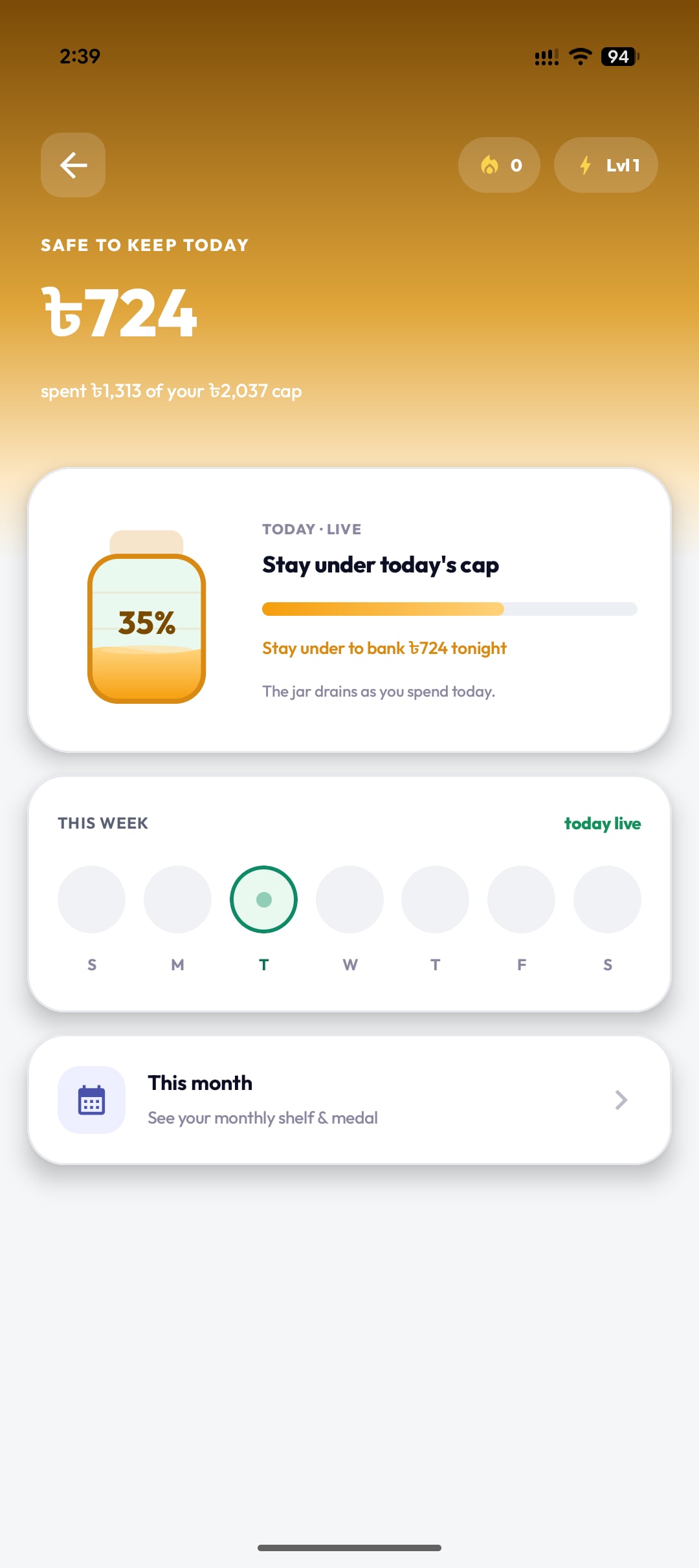
The top of the Challenges screen is your quick daily read. Four things matter:
- Safe to keep today: a live amount like ৳724 — what you bank tonight if you stay under your cap, with the line spent ৳1,313 of your ৳2,037 cap.
- Today's cap card: a TODAY · LIVE jar that fills as the day goes, with a percentage and "Stay under to bank ৳724 tonight". The jar drains as you spend.
- This week: a row of day dots (S–S) marking the current day live, so you can see your rhythm at a glance.
- This month: a shortcut to your monthly shelf and medal for the streaks you held.
Do: check the safe-to-keep number before a bigger spend. Whatever you keep under the cap is banked for you — no manual logging.
Your challenge level
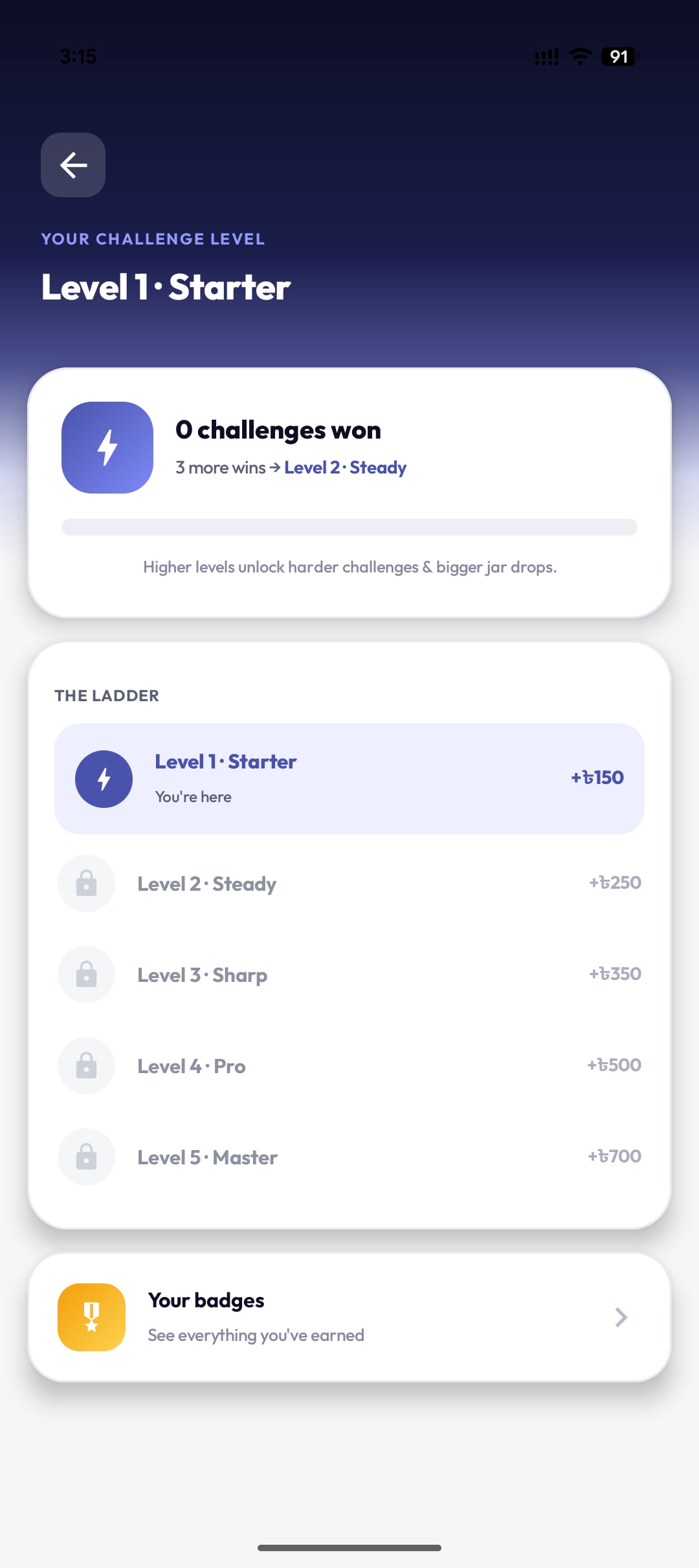
Shows: your current rank — for example Level 1 · Starter — how many wins until the next level (3 more wins → Level 2 · Steady), and the ladder: Starter, Steady, Sharp, Pro, and Master.
Each rung lists its jar drop, from +৳150 at Starter up to +৳700 at Master. Higher levels unlock harder challenges and bigger drops.
Do: treat the ladder as your long game. Win days, climb a level, and the rewards grow with you.
Badges and achievements
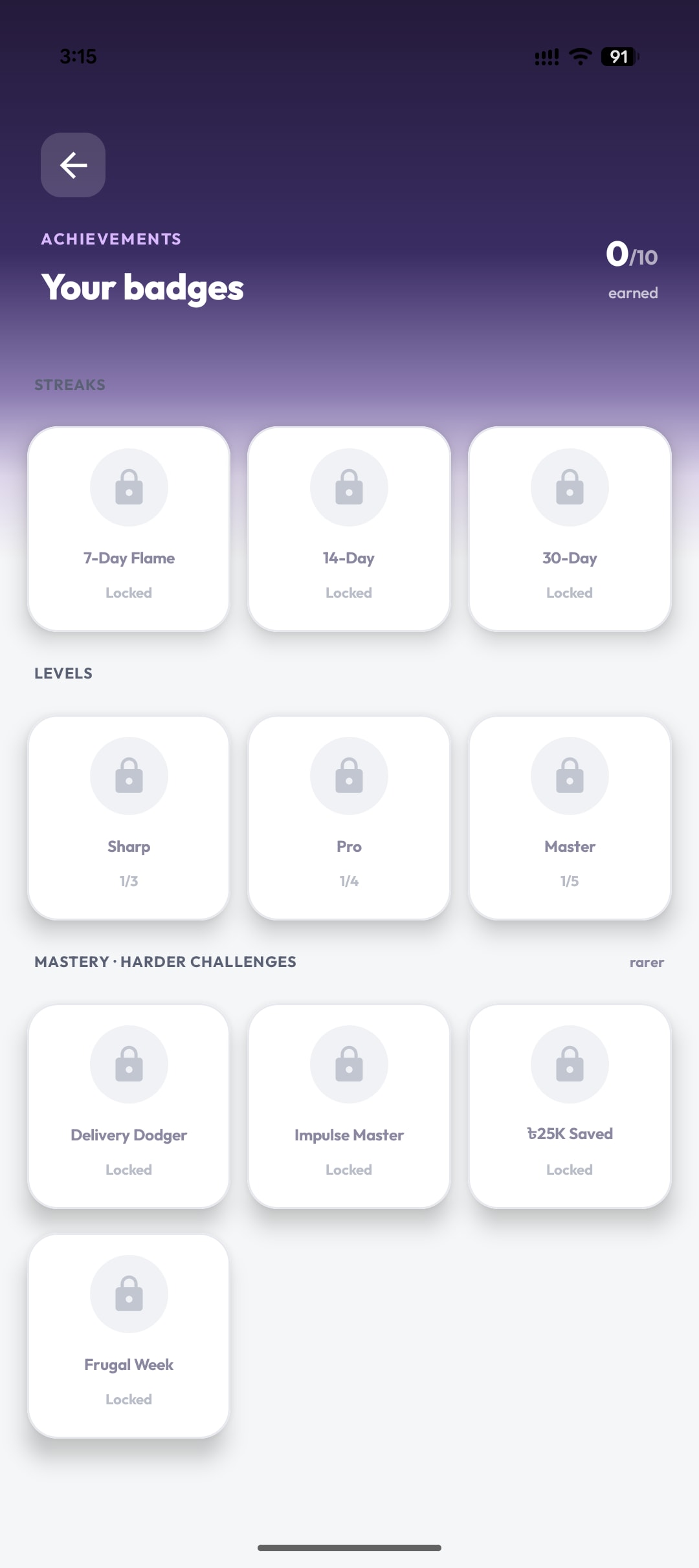
Shows: your Achievements shelf and an earned count like 0/10. Badges are grouped into Streaks (7-Day Flame, 14-Day, 30-Day), Levels (Sharp, Pro, Master with progress like 1/3), and rarer Mastery badges such as Delivery Dodger, Impulse Master, ৳25K Saved, and Frugal Week.
Do: use the shelf to see what is close. A badge at 1/3 is one or two good weeks away — a small, concrete target.
How to use Challenges day to day
You do not need to open this screen constantly. The Today screen shows a compact challenge card with a progress bar, and that is enough most days. Open the full Challenges screen once or twice a week to check the jar, see how close you are to the next level, and glance at the badges you are working toward.
Progress updates on its own as your supported bank SMS comes in, so there is nothing to log manually.
What to do if something looks wrong
- No challenges or only simple ones: Ledgr likely needs more spending history. Give it a few weeks of supported bank SMS and the challenges become more personal.
- The cap feels unfair: today’s cap is based on your own recent averages, not a fixed number — it adjusts as your spending does.
- Counted spending looks off: check that the merchant sits in the right category. If not, fix it in Organize so future transactions count correctly.
- A missed day: nothing to fix. The jar simply does not fill that day, and a new cap arrives tomorrow.
Privacy in one line
- Challenges are built from transactions already stored in Ledgr on your phone.
- Supported bank SMS is parsed locally on your phone. No bank login.
- Challenges themselves do not need AI consent or raw SMS upload.
- Anonymous beta metrics may record local challenge engagement with a device ID, not raw SMS.
FAQ
Do I have to set up challenges myself? No. Ledgr sets today’s cap automatically from your recent spending and refreshes it each day.
What happens when I win or miss a day? Staying under the cap banks the safe-to-keep amount into your jar and counts toward your next level. Missing a day simply means the jar does not fill — no penalty, and a fresh cap arrives tomorrow.
What are levels and badges for? Levels (Starter through Master) grow your jar drops as you win more days. Badges mark streaks, level milestones, and harder mastery goals like Frugal Week or ৳25K Saved.
Can I see past weeks and months? Yes. The “This month” shortcut opens your monthly shelf and medals, so you can review earlier streaks.
Are my challenges saved if I reinstall? Active challenges, levels, and badges are included in Ledgr backup and restore, so a restored backup can bring them back when the backup version supports them.